> For the complete documentation index, see [llms.txt](https://docs.scaleflex.com/llms.txt). Markdown versions of documentation pages are available by appending `.md` to page URLs; this page is available as [Markdown](https://docs.scaleflex.com/portals/building-a-portal/sections.md).
# Sections
Sections are the blocks a page is built from. Stack them to make the page you want.
A page in a Portal is a stack of sections. Each one does a job — open the page, tell part of the story, show a set of assets, point somewhere else — and you build the page by adding sections and putting them in order.
Most sections come in several **variants**: the same content arranged differently. Pick the section for what it does, then the variant for how it should look.
## Add a section
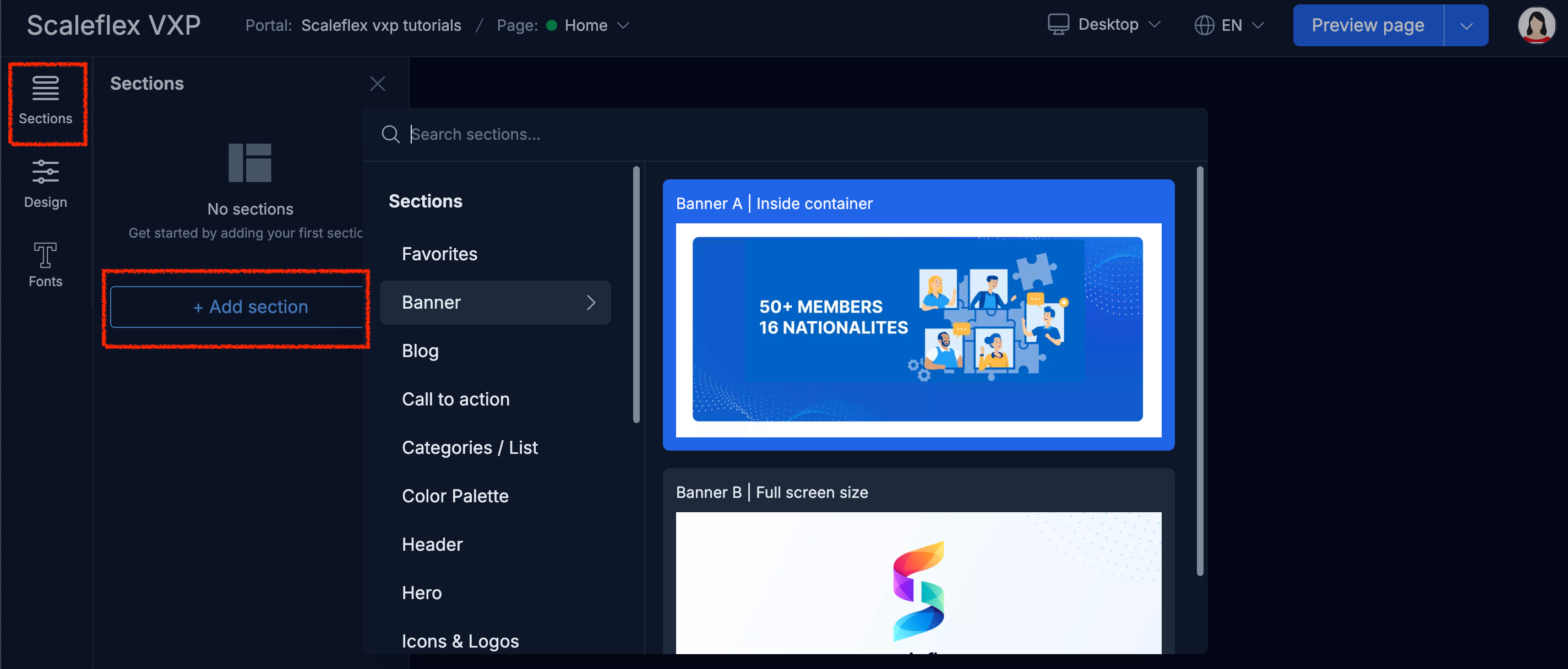
1. In the builder, open the **Sections** panel.
2. Select **Add section**.
3. Browse or search the library, then select **Add section** on the one you want.
The section library, opened from Add section.
Selecting a section on the canvas brings up its toolbar, where you switch variant, invert its colours, set a background, open its layout settings, and reach the rest of its options.
The toolbar on a section selected in the builder.
{% hint style="warning" %}
Changes only reach visitors after you select **Publish changes**.
{% endhint %}
## In this section
* [Section library](/portals/building-a-portal/sections/section-library.md): Every section type and its variants.
* [Working with sections](/portals/building-a-portal/sections/working-with-sections.md): Reorder, rename, clone, hide and delete.
* [Section layout and background](/portals/building-a-portal/sections/section-layout-and-background.md): Width, spacing, alignment, background.
* [Gallery](/portals/building-a-portal/sections/gallery.md): The section that shows assets from your DAM.
* [Moodboard](/portals/building-a-portal/sections/moodboard.md): A collection as a wall visitors search and explore.
* [Share your files](/portals/building-a-portal/sections/share-your-files.md): Letting visitors send files of their own.